Back to explore1 copiesUpdated 1 month ago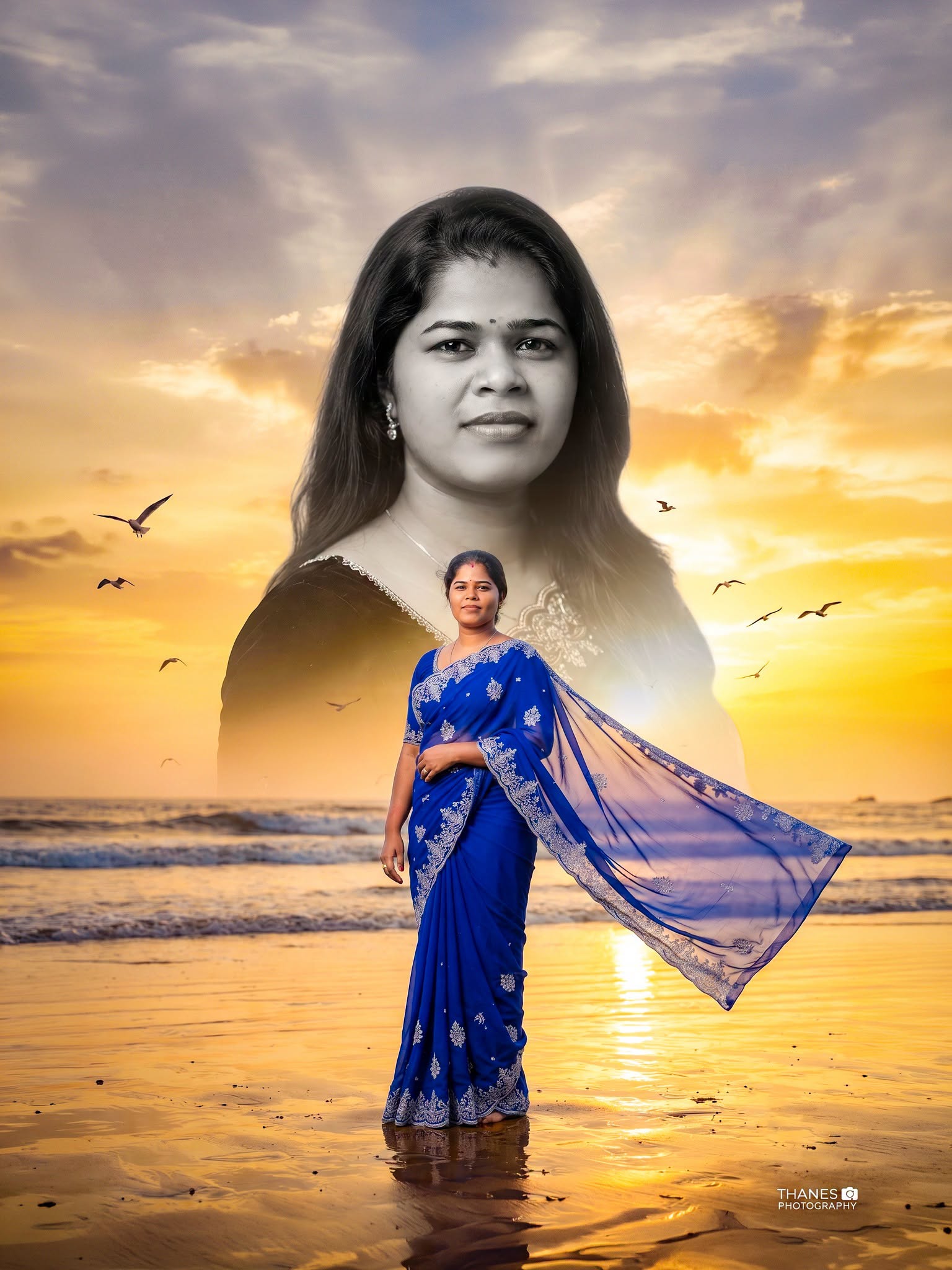
Girls
general
advanced
Premium Cinematic Double Exposure Beach Sunset Portrait | Royal Blue Saree | Ultra Realistic 8K
Create a luxury cinematic double exposure portrait with perfect face preservation, premium Photoshop beauty retouch, elegant royal blue saree, monochrome artistic overlay, golden sunset beach background, DSLR realism, and 8K studio-quality finish.
0.0 (0)
Prompt content
Create a premium cinematic double exposure portrait using my uploaded image as the ONLY face reference.
⚠️ HIGHEST PRIORITY – FACE PRESERVATION
• Use only the uploaded person's face.
• Preserve the original identity exactly.
• Do NOT change the face shape, eyes, eyebrows, eyelashes, nose, lips, smile, jawline, forehead, ears, hairstyle, glasses, skin tone, or facial expression.
• Keep 100% facial resemblance.
ULTRA PROFESSIONAL FACE RETOUCH
Apply luxury Photoshop-quality beauty retouching to BOTH the foreground portrait and the background double-exposure portrait.
• Remove all pimples, acne, scars, dark spots, pigmentation, freckles, temporary marks, blemishes, wrinkles, under-eye darkness, and skin imperfections.
• Make the skin naturally smooth while preserving realistic pores and texture.
• Remove all facial spots and stains.
• Brighten the eyes naturally.
• Enhance eyelashes and eyebrows.
• Naturally whiten the teeth.
• Improve facial lighting.
• Keep the skin realistic.
• No plastic skin.
• No wax effect.
• No AI-looking face.
• Ultra HD facial details.
FOREGROUND PORTRAIT
• Create a NEW full-body portrait using the uploaded face.
• Do NOT use or copy the original clothing from the uploaded image.
• Dress the subject in a premium royal blue designer saree with elegant silver embroidery and a long transparent flowing pallu moving naturally in the wind.
• Show the complete body from head to feet.
• Natural standing pose.
• Elegant feminine posture.
• Bare feet touching the beach sand.
• Ultra realistic fabric details.
BACKGROUND DOUBLE EXPOSURE
• Create a very large portrait of the same person behind the foreground subject.
• The background portrait must NOT use the uploaded clothing.
• Use only the uploaded face and recreate the portrait with elegant styling.
• Retouch the background face exactly like the foreground.
• Remove every skin blemish, spot and imperfection.
• Convert the background portrait into Ultra Premium Black & White.
• Fine-art monochrome.
• Deep rich blacks.
• Bright clean whites.
• High contrast.
• Soft grey transitions.
• Approximately 50% opacity.
• Smooth feathered edges.
• Blend naturally into the sunset sky with soft mist.
BACKGROUND
• Beautiful beach during golden sunset.
• Warm orange sky.
• Ocean waves.
• Wet sand reflections.
• Flying birds.
• Soft cinematic clouds.
• Golden sunlight.
• Volumetric lighting.
• Luxury cinematic atmosphere.
LIGHTING
• Hollywood cinematic lighting.
• Golden-hour light.
• HDR.
• Soft rim light.
• Professional colour grading.
• Natural skin tones.
• DSLR realism.
• Balanced exposure.
QUALITY
• Hyper realistic.
• Adobe Photoshop premium editing.
• Luxury wedding studio quality.
• DSLR camera look.
• 85mm portrait lens.
• f/1.8 aperture.
• Ultra sharp focus.
• 8K Ultra HD resolution.
• High Dynamic Range.
• Extremely detailed.
• Premium cinematic finish.
WATERMARK
Add a small elegant handwritten signature:
THANES
(with a tiny camera icon)
PHOTOGRAPHY
• Bottom-right corner only.
• White colour.
• 40% opacity.
• Professional luxury studio branding.
• Small, clean and non-distracting.
NEGATIVE PROMPT
low quality, blurry, duplicate face, cropped body, half body, bad anatomy, extra fingers, distorted hands, plastic skin, wax skin, AI face, changed identity, original clothing copied, poor blending, oversaturated colours, noisy image, low resolution, bad double exposure, artifacts, unwanted text, logo, watermark anywhere except the bottom-right THANES Photography watermark.
Reviews (0)
Leave a review
No reviews yet
Be the first to share your experience and tips for getting the best output with this prompt.