Back to explore15 copiesUpdated 1 month ago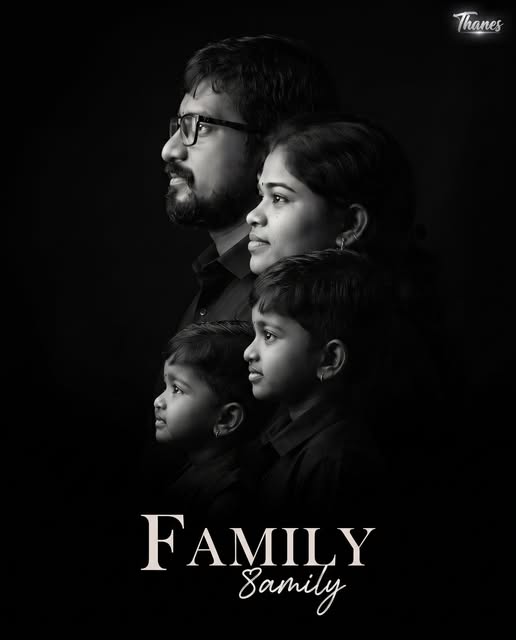
Family
general
advanced
Ultra-Realistic Family Side Profile Fine Art Portrait
Create a premium ultra-realistic cinematic family side-profile portrait using every uploaded person's exact original face. Automatically arranges family members with elegant depth, monochrome fine-art styling, luxury studio lighting, and perfect face preservation.
0.0 (0)
Prompt content
Create an ultra-realistic premium family side-profile portrait in Facebook portrait size (4:5, 1080×1350). Use ONLY the uploaded family members' ORIGINAL FACES exactly as they appear. Preserve each person's facial identity 100%, including face shape, eyes, eyebrows, nose, lips, ears, forehead, hairstyle, skin tone, beard, mustache, expression, facial proportions, and every unique facial detail. Never regenerate, beautify, replace, reshape, or alter any face. Every uploaded face must remain exactly identical.
Automatically detect the uploaded family members and create a natural layered side-profile composition.
Dynamic Composition Rules:
If Father + Mother + 1 Child are uploaded, arrange them in a beautiful layered side-profile portrait.
If Father + Mother + 2 Children are uploaded, automatically place both children naturally between and slightly in front of the parents with balanced spacing.
If Father + Mother + 3 Children are uploaded, automatically create a premium cinematic layered composition where all children are placed naturally in front of the parents according to their height and age, maintaining perfect visual balance.
If only Mother + Children are uploaded, create a beautiful mother-and-children side-profile portrait.
If only Father + Children are uploaded, create a powerful father-and-children portrait.
Always keep every family member visible without overlapping or hiding faces.
Arrange the tallest adults at the back and children progressively toward the front while maintaining realistic depth.
Every family member should face toward the left side with calm, loving, hopeful expressions, looking slightly upward. Maintain equal spacing, natural perspective, and elegant depth between each face.
Dress everyone in elegant matte black clothing that blends smoothly into the background. Use a deep pure black studio background with dramatic low-key lighting. Illuminate only the faces using soft cinematic side lighting, creating rich highlights and smooth shadows while preserving natural skin texture.
Apply premium monochrome (black-and-white) fine-art color grading with deep blacks, bright highlights, HDR quality, shallow depth of field, creamy transitions, and luxury studio portrait aesthetics.
Camera: Sony A7R V, 85mm GM Lens, f/1.4, ISO 100, professional studio lighting, ultra-sharp eyes, 8K resolution, museum-quality fine-art portrait photography.
Keep the bottom portion clean with generous negative space. Add the word "FAMILY" at the bottom center in elegant luxury typography with a large serif "F" and the remaining letters in a modern handwritten font.
Watermark: Place a small premium semi-transparent "Thanes" watermark in the top-right corner, white with a subtle silver glow, approximately 40% opacity, professionally blended into the image.
Negative Prompt: Cartoon, painting, illustration, CGI, anime, AI face replacement, face swap, facial enhancement, altered identity, distorted face, extra people, missing people, cropped faces, overlapping faces, bad anatomy, extra limbs, blur, low resolution, noise, plastic skin, unrealistic lighting, text errors, unwanted accessories, logos (except the "Thanes" watermark), artifacts.
Reviews (0)
Leave a review
No reviews yet
Be the first to share your experience and tips for getting the best output with this prompt.